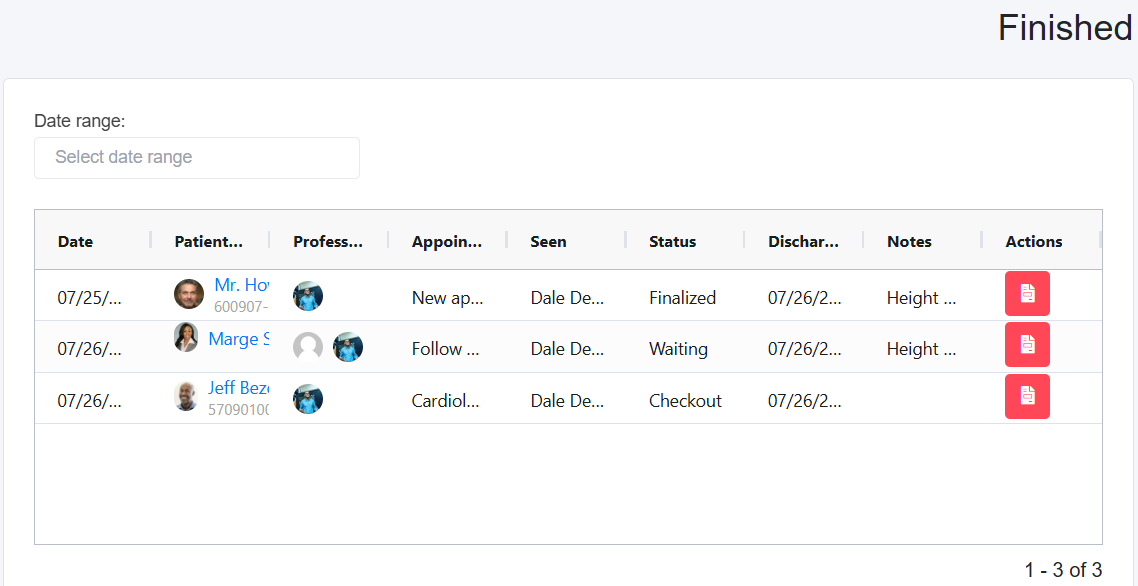
The Finish page has all the appointments discharged for the day after the Discharge button is selected.
On the Finish page, the Status column will display either:
Waiting- The appointment has more than one medical professional, and the patient has already seen one or more and is waiting to see another medical professional or other medical professionals.
Checkout- All medical professionals (even if it is one medical professional) have discharged the patient, and now they are statused as Checkout for the front desk to check them out.
Finalized- The front desk has discharged the patient, including sorting out any bills.
The Seen Column shows which medical professional or professionals have discharged their part of the appointment.
The Professional column shows which professionals are part of the appointment, regardless of whether they have discharged the appointment as yet.